

How to Launch Holiday Campaigns in Hours, Not Weeks
Your competitor just launched their Valentine's Day campaign. Beautiful hero banner, countdown timer, exclusive offers highlighted perfectly. Their email went out yesterday.
You're still waiting on a developer quote.
This scenario plays out thousands of times every holiday season. Store owners know exactly what they want to promote, but the technical bottleneck turns "quick campaign" into "three-week project." By the time your page goes live, half the holiday shopping window is gone.
There's a better way.
The Holiday Timeline Problem
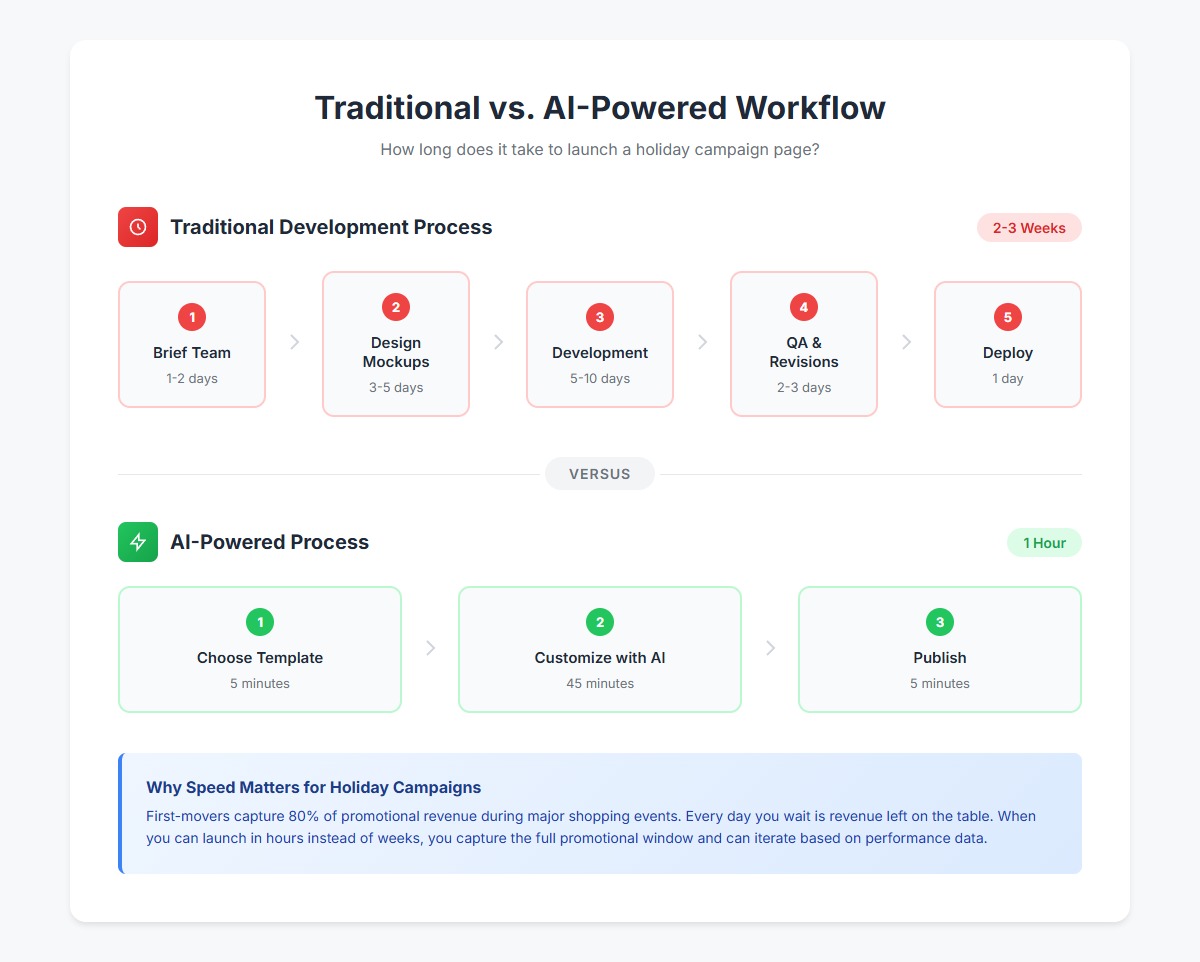
Here's the traditional workflow for launching a holiday campaign page:
- Brief the team (1-2 days): Explain the vision, gather assets, write copy
- Wait for design (3-5 days): Designer creates mockups, rounds of revisions
- Wait for development (5-10 days): Developer codes the page, fixes bugs
- QA and revisions (2-3 days): Test, find issues, request changes
- Deploy (1 day): Finally go live
Total: 2-3 weeks minimum
Meanwhile, the reality is brutal:
- Black Friday planning starts in September, but execution needs to happen in days
- Valentine's Day campaigns need to launch early January to capture gift-buying traffic
- Flash sales are literally about speed—if you can't launch in hours, you've missed the point
Industry data shows that first-movers capture 80% of promotional revenue during major shopping events. Every day you wait is revenue left on the table.
The 4 Sections Every Holiday Campaign Needs
Regardless of which holiday you're targeting, successful campaign pages follow a proven structure:
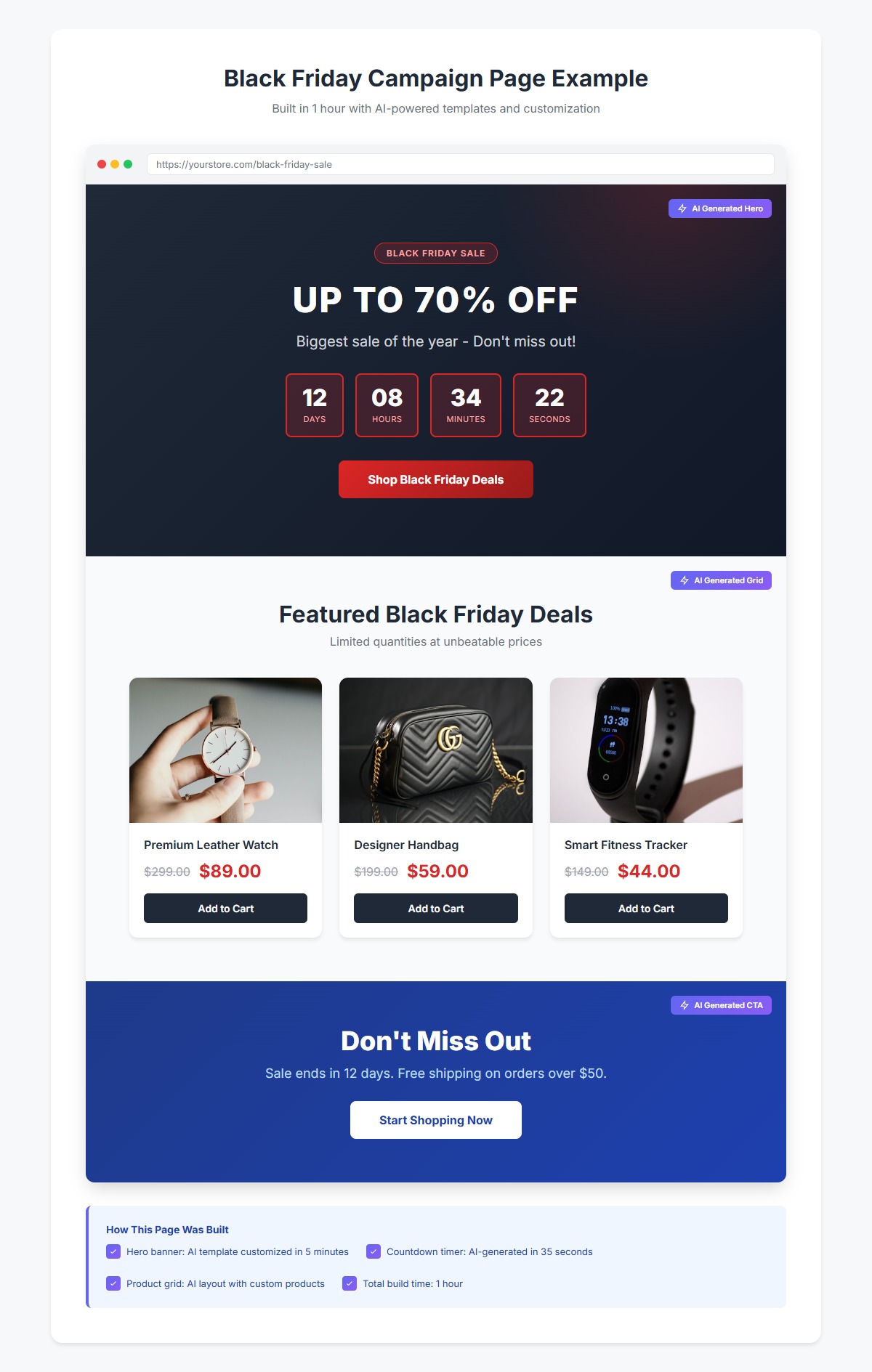
1. Hero Banner with Countdown Timer
Your hero section needs to communicate three things instantly:
- What's the offer? ("Up to 70% Off Sitewide")
- When does it end? (Countdown timer creating urgency)
- What should I do? (Clear CTA button)
The countdown timer is critical. It transforms a static offer into a ticking clock that drives action.

2. Product Showcase Grid
Don't make visitors hunt for your sale items. Feature them prominently:
- 4-8 hero products or categories
- Clear original vs. sale pricing
- High-quality product images
- Quick "Add to Cart" functionality
The grid should be scannable in seconds. Visitors should immediately see what's on offer and how much they'll save.
3. Social Proof and Urgency Section
Build trust and amplify urgency with:
- Customer testimonials or reviews
- "Limited stock" indicators
- "X people viewing this" social signals
- Trust badges (secure checkout, free shipping, returns)
This section answers the critical question: "Why should I buy from you instead of researching competitors?"
4. Newsletter Capture with Holiday Offer
Even visitors who don't buy immediately are valuable:
- Exclusive subscriber discount code
- Early access to future sales
- Gift guides and holiday content
- Simple email collection form
Your campaign page should build your list while it drives sales.
Tutorial: Build a Black Friday Campaign Page in 1 Hour
Let's walk through creating a complete Black Friday campaign page from scratch. No coding required.
Step 1: Choose Your Hero Banner Template (5 minutes)
Start with a pre-built template that matches your brand aesthetic:
- Open the AI HTML Widget in your BigCommerce page builder
- Browse the "Holiday Campaign" template category
- Select the Black Friday hero banner template
- Customize the colors to match your brand (update the background gradient, button colors)
- Replace placeholder text with your actual offer
The template handles all the responsive design, animations, and cross-browser compatibility automatically.
Step 2: Add AI-Generated Countdown Section (10 minutes)
Rather than coding a countdown timer from scratch, generate it with AI:
Prompt: "Create a countdown timer section for Black Friday. Dark background with gold accents. Shows days, hours, minutes, seconds. Headline 'Flash Sale Ends In' above the timer. Make the numbers large and bold with a subtle glow effect."
The AI generates production-ready code in 30-45 seconds. You can then:
- Adjust the end date/time
- Tweak colors to match your brand
- Add or remove text elements
- Preview how it looks on mobile
Step 3: Create Product Showcase Grid (15 minutes)
Display your sale products in an attractive grid:
Prompt: "Create a product grid section with 6 items. Each product card should have an image placeholder, product name, original price with strikethrough, sale price in red, and an 'Add to Cart' button. Dark card backgrounds with hover effects. Responsive: 3 columns on desktop, 2 on tablet, 1 on mobile."
Once generated:
- Replace image placeholders with your actual product images
- Update product names and pricing
- Link the "Add to Cart" buttons to your product pages
- Adjust the grid to show more or fewer products
Step 4: Add Urgency and Social Proof (15 minutes)
Build trust with a testimonials and urgency section:
Prompt: "Create a social proof section with 3 customer testimonials in cards. Include a 5-star rating, quote, and customer name. Below that, add a row of trust badges: 'Free Shipping', 'Secure Checkout', '30-Day Returns', 'Price Match Guarantee'. Modern, clean design with subtle shadows."
Customize with:
- Real customer testimonials from your reviews
- Actual trust badges and guarantees you offer
- Your brand colors and fonts
Step 5: Newsletter Capture with Holiday CTA (10 minutes)
Convert browsers into subscribers:
Prompt: "Create a newsletter signup section with Black Friday theme. Headline 'Get Exclusive Black Friday Deals First', subheadline about early access, email input field, and subscribe button. Include a '10% off your first order' incentive. Dark background with gold accents, centered layout."
Connect to your email service provider and you're capturing leads.
Step 6: Publish and Promote (5 minutes)
- Preview your complete page on desktop, tablet, and mobile
- Make any final tweaks
- Publish the page
- Share the URL in your email campaigns, social media, and ads
Total time: 1 hour
You now have a professional holiday campaign page that would have taken weeks through traditional development.
Holiday Campaign Calendar: Plan Ahead
Don't wait until the last minute. Here's when to launch campaigns for maximum impact:
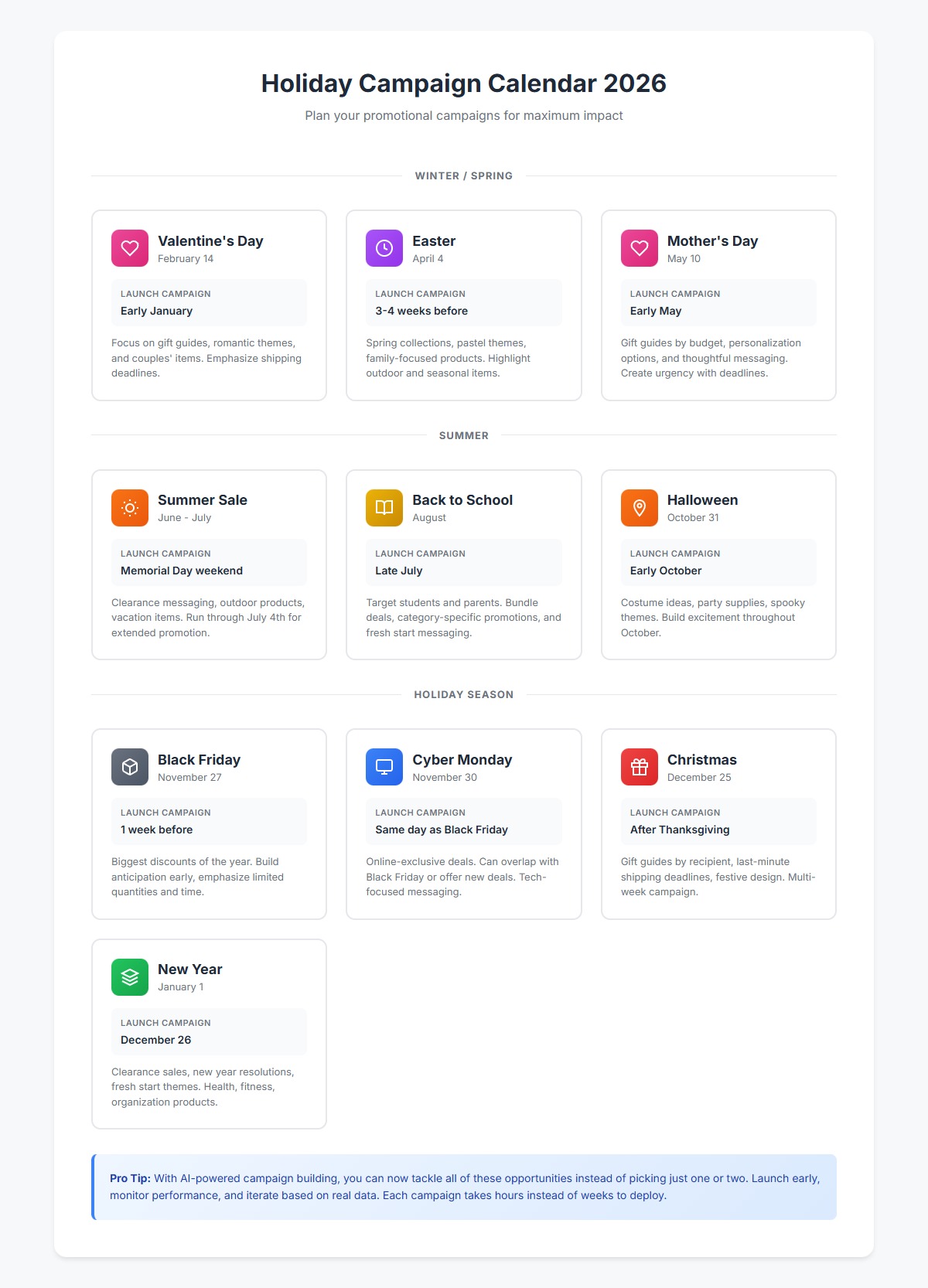
- Valentine's Day (Feb 14): Launch early January, capture gift-buying traffic
- Easter (March/April): Start 3-4 weeks before, focus on spring collections
- Mother's Day (May): Launch early May, emphasize gift guides
- Summer Sale (June/July): Start Memorial Day weekend, run through July 4th
- Back to School (August): Launch late July, target parents and students
- Halloween (Oct 31): Start early October, seasonal products and costumes
- Black Friday (Nov): Launch the week before, build anticipation
- Cyber Monday (Nov): Immediate follow-up to Black Friday
- Christmas (Dec 25): Start after Thanksgiving, emphasize shipping deadlines
- New Year (Jan 1): Launch Dec 26, clearance and fresh starts
With the ability to build campaign pages in hours, you can now tackle all of these opportunities instead of picking just one or two.
Tips for Maximum Impact
Launch Early, Iterate Fast
The beauty of rapid development is the ability to iterate. Launch your campaign page 2-3 weeks before the holiday, then:
- Monitor performance metrics (bounce rate, conversion rate)
- A/B test different hero images or headlines
- Add products based on early interest
- Adjust offers if needed
You're not locked into your first version. Improve as you go.
A/B Test Hero Banners
Your hero banner is the first thing visitors see. Test variations:
- Different discount amounts ("70% off" vs "Buy 2 Get 1 Free")
- Urgency language ("Ends Tonight" vs "Limited Time")
- Visual styles (product photos vs lifestyle images)
- CTA button text ("Shop Now" vs "Claim My Discount")
When you can generate new variations in minutes, testing becomes practical.
Mobile-First Design
Over 60% of holiday shopping traffic comes from mobile devices. Ensure your campaign page:
- Loads quickly on mobile networks
- Has large, tappable buttons
- Shows critical information above the fold
- Makes checkout frictionless
The AI HTML Widget's templates are mobile-responsive by default, but always preview and test.
Use Dynamic Content
Personalize the experience where possible:
- Show returning customers different offers
- Highlight recently viewed products in your sale grid
- Adjust messaging based on traffic source (email vs social vs organic)
Optimize for Speed
A one-second delay in page load time can reduce conversions by 7%. Holiday shoppers are impatient:
- Optimize all images before uploading
- Minimize the number of custom fonts
- Use lazy loading for below-the-fold content
- Test page speed on actual mobile devices
Create Urgency Without Being Pushy
Urgency drives action, but fake scarcity damages trust:
- Use real countdown timers (not fake ones that reset)
- Display actual inventory levels if they're low
- Highlight genuine shipping deadlines
- Be transparent about offer terms
Customers appreciate honest urgency, not manipulation.
Prepare Customer Support
Before your campaign goes live:
- Brief your support team on the offers
- Create FAQ content for common questions
- Set up automated responses for peak times
- Ensure inventory data is accurate
A great campaign page drives traffic. Great support converts it.
The Competitive Advantage of Speed
Here's what changes when you can launch holiday campaigns in hours instead of weeks:
You can test more offers. Instead of committing to one big Black Friday campaign, you can try a weekend flash sale in early November, see what resonates, then refine your main event.
You can respond to competitors. When a competitor launches a promotion, you're not stuck watching. You can respond with your own offer the same day.
You can capture spontaneous opportunities. Trending topic relevant to your products? Unexpected weather event driving demand? You can have a campaign page live before the moment passes.
You can expand to more holidays. When each campaign took weeks, you picked your battles—maybe just Black Friday and Christmas. Now you can tackle Valentine's Day, Mother's Day, Halloween, and everything in between.
You maintain momentum. Instead of big campaigns separated by months of silence, you can run regular promotions that keep customers engaged year-round.
Speed isn't just about launching faster. It's about unlocking entirely new strategic possibilities.
Real Store Example: From 3 Weeks to 3 Hours
A mid-sized apparel retailer wanted to launch a Valentine's Day gift guide campaign. Their previous Black Friday campaign had taken three weeks to develop and cost $4,500 in design and development fees.
For Valentine's Day, they tried a different approach:
Hour 1: Selected and customized a romantic hero banner template. Deep red gradient, "Find the Perfect Gift" headline, countdown to Valentine's Day.
Hour 2: Used AI to generate a gift guide section with product recommendations segmented by budget ("Under $50", "$50-$100", "$100+"). Added their actual products with images and pricing.
Hour 3: Created a social proof section featuring customer testimonials about gifting, plus a newsletter signup offering a "10% off couples' items" discount code.
Total cost: $0 in development fees. Total time: 3 hours.
The campaign launched three weeks before Valentine's Day, giving them the full promotional window. They iterated twice based on early analytics, swapping out underperforming products in the gift guide.
Result: 34% increase in Valentine's Day revenue compared to the previous year, and they still had time to create a follow-up "Last Chance Gifts" page for Feb 13th.
From Bottleneck to Superpower
The traditional web development process turns holiday campaigns into major projects. Briefs, timelines, revisions, approvals—by the time you're done, the holiday has passed.
When you can generate professional campaign pages in an hour, everything changes. Holidays transform from stressful deadlines into revenue opportunities. You're no longer choosing which events to promote—you can tackle all of them.
You're not waiting for developers. You're not constrained by budget. You're not missing windows.
You're launching campaigns while your competitors are still scheduling kickoff meetings.

Ready to launch your next holiday campaign in hours instead of weeks? The AI HTML Widget is available free on the BigCommerce App Marketplace. Install it, choose a template, and have your campaign page live before lunch.
Your next holiday starts now.


