


BigCommerce Product Review Images: Boost Trust & Sales with Photo Reviews
Have you ever hesitated before buying a product online because the reviews were just plain text? You are not alone. Studies show that seventy-seven percent of shoppers actively look for reviews with photos before making a purchase decision. Visual reviews transform passive browsers into confident buyers, and for BigCommerce store owners, there is now a simple way to make this happen.
The Product Review Images app by PapaThemes brings photo-powered reviews to your BigCommerce store with zero coding required. Combined with extended review criteria, customizable rating types, and full rich snippet support, this app is a complete solution for building trust and driving conversions.
In this guide, we will explore how Product Review Images works, why photo reviews matter for your bottom line, and how to leverage every feature to maximize your store's credibility on both your website and Google search results.
Why Photo Reviews Are Essential for Ecommerce Success
The Trust Gap in Online Shopping
Online shoppers cannot touch, feel, or try products before purchasing. This creates a fundamental trust gap that text-only reviews struggle to bridge. When customers share real photos of products they have received, it provides authentic social proof that no amount of professional product photography can replicate.
Consider these statistics:
- Seventy-seven percent of consumers prefer reviews that include customer photos
- Product pages with photo reviews see up to two times higher conversion rates compared to text-only reviews
- Ninety-three percent of consumers say online reviews influence their purchasing decisions
- Stores with visual reviews experience twenty-five percent lower return rates because customers have realistic expectations
The SEO Advantage of Rich Review Content
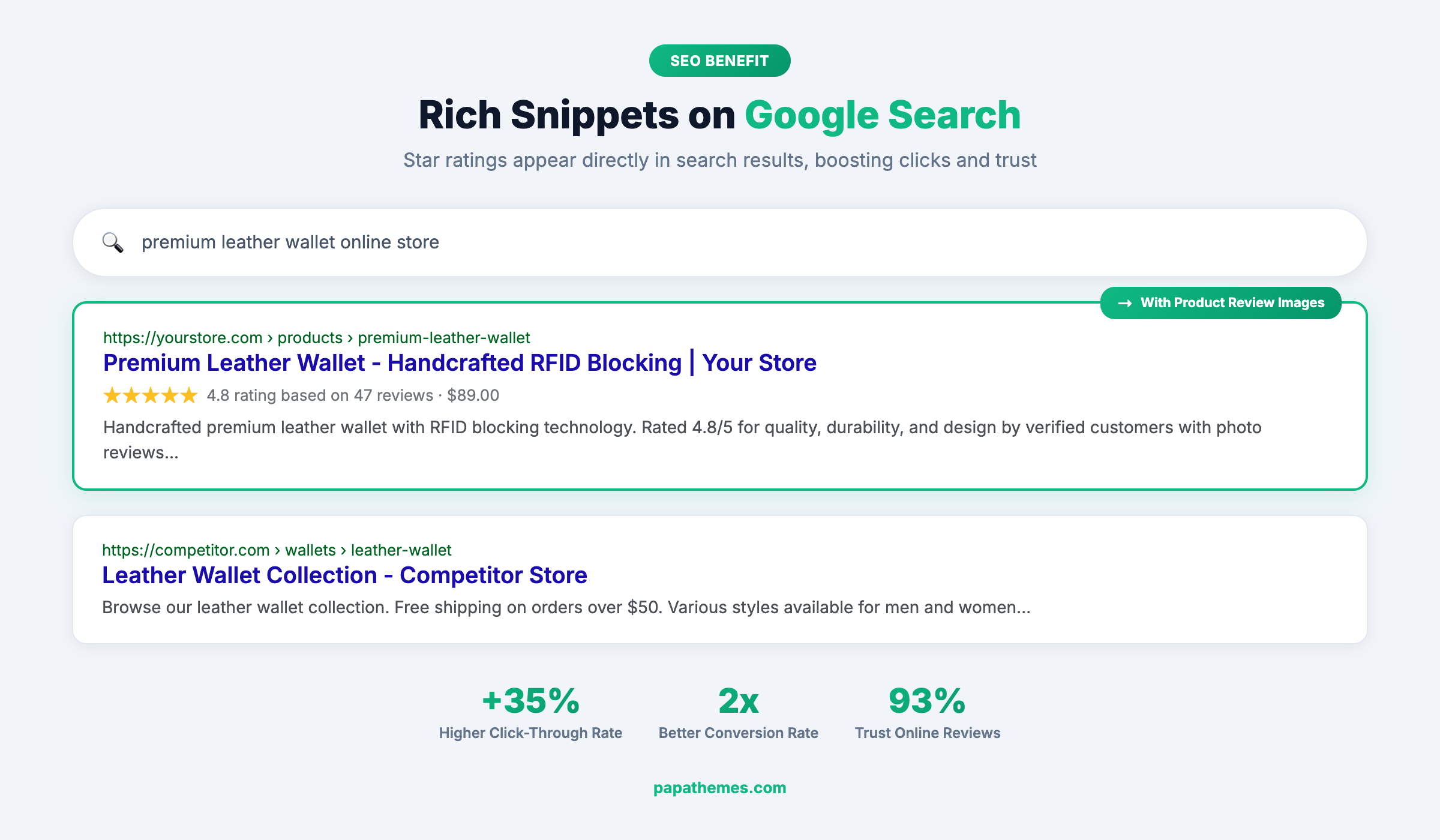
Photo reviews do more than build trust on your product pages. When paired with proper schema markup and rich snippets, your review content appears directly in Google search results. Those gold star ratings beneath your product listings dramatically increase click-through rates, driving more organic traffic to your store.
Google's Product structured data supports review ratings, and stores that display aggregate ratings in search results see up to thirty-five percent higher click-through rates compared to listings without stars.
Introducing Product Review Images by PapaThemes
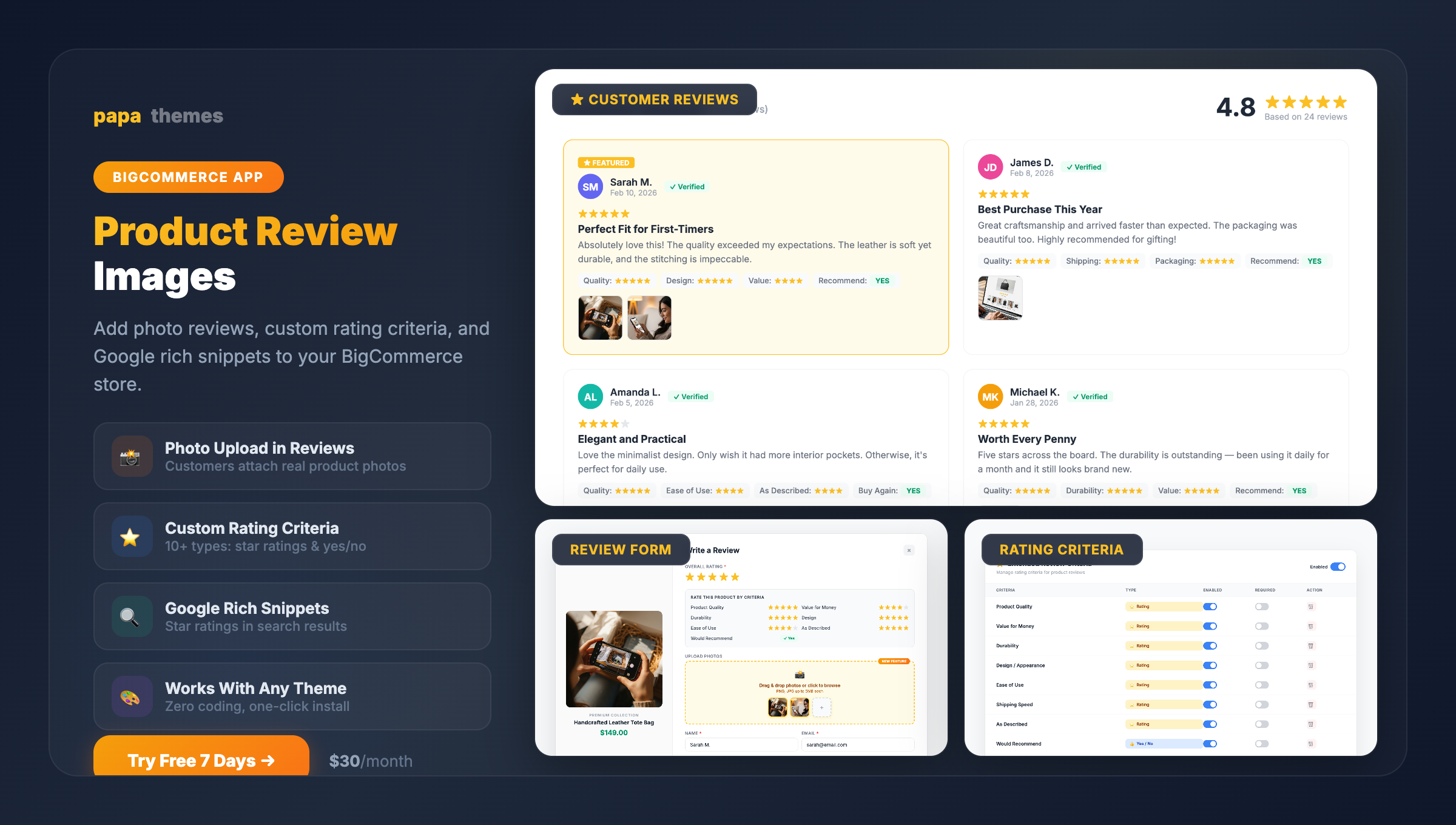
The Product Review Images app is designed specifically for BigCommerce merchants who want to enhance their native reviews system without the complexity of third-party review platforms. Here is what makes it stand out.
One-Click Installation, Zero Coding
Getting started takes minutes, not hours. The app installs through BigCommerce's Script Manager with a simple copy-paste process. There are no theme files to edit, no developer required, and no risk of breaking your store's design. It works immediately after installation with any BigCommerce theme.
Seamless Native Integration
Unlike standalone review platforms that replace your existing reviews, Product Review Images enhances BigCommerce's built-in review system. This means:
- Your existing reviews are preserved — nothing gets lost or requires re-importing
- Reviews persist even if you uninstall — your content stays safe in BigCommerce's native system
- Consistent experience — the review form and display match your theme's look and feel
- No vendor lock-in — you are not dependent on a third-party platform to host your reviews
This approach is particularly valuable for established stores that already have hundreds or thousands of reviews. There is no migration headache and no risk of losing valuable social proof.
Key Features That Drive Results
Feature 1: Customer Photo Upload in Reviews
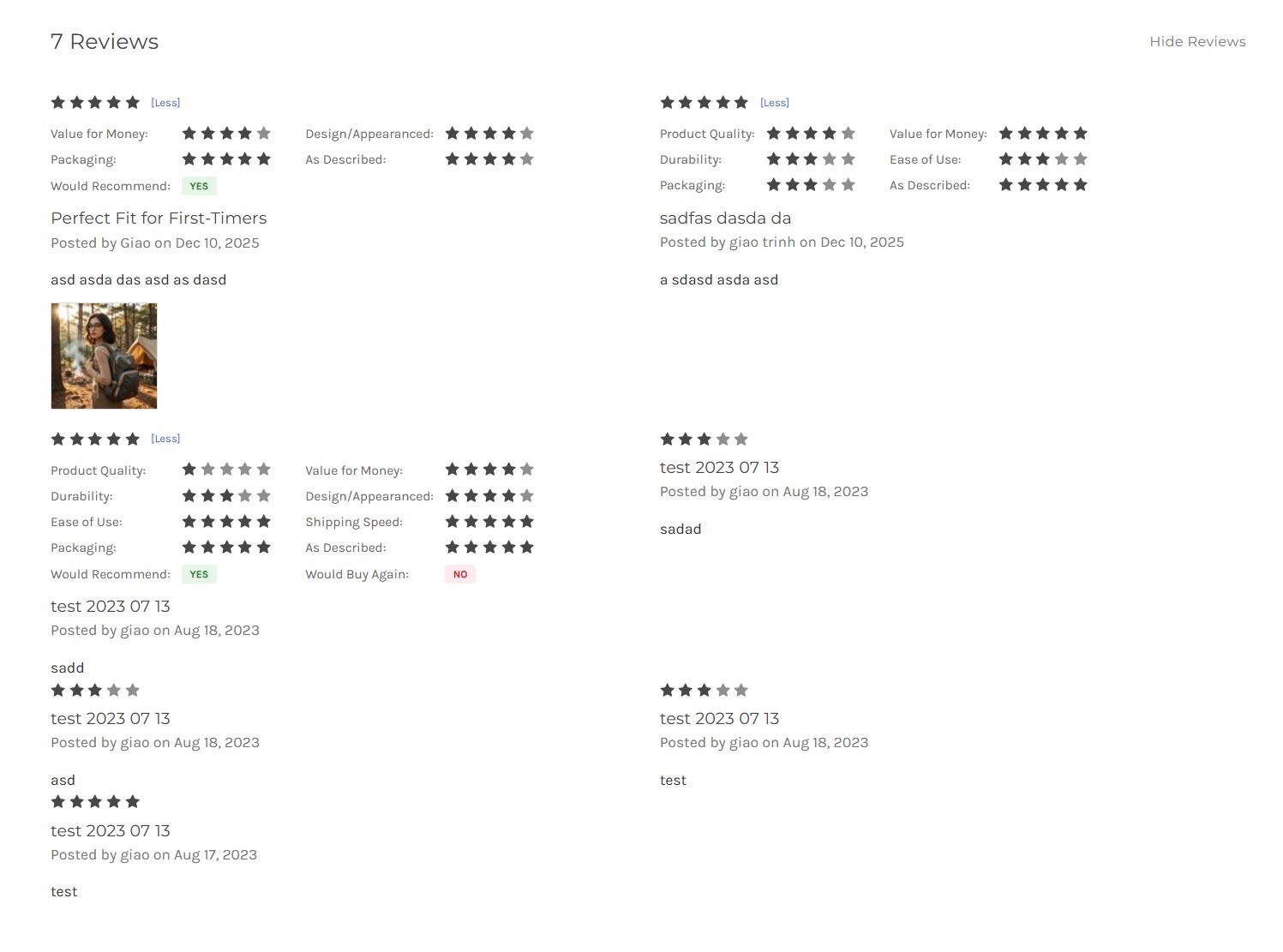
The core feature adds an intuitive image upload field directly to the "Write a Review" form on every product page. Customers can easily attach photos of the products they have received, creating authentic visual testimonials.

How it works:
- A customer clicks "Write a Review" on any product page
- The review form appears with rating criteria and a "Drop files here to upload" section
- Customers rate the product on each criterion, write their feedback, and attach photos
- Photos display automatically below each review after moderation
The upload interface is clean, intuitive, and responsive. It adapts to your theme's styling, so it feels like a natural part of your store rather than a bolted-on widget.
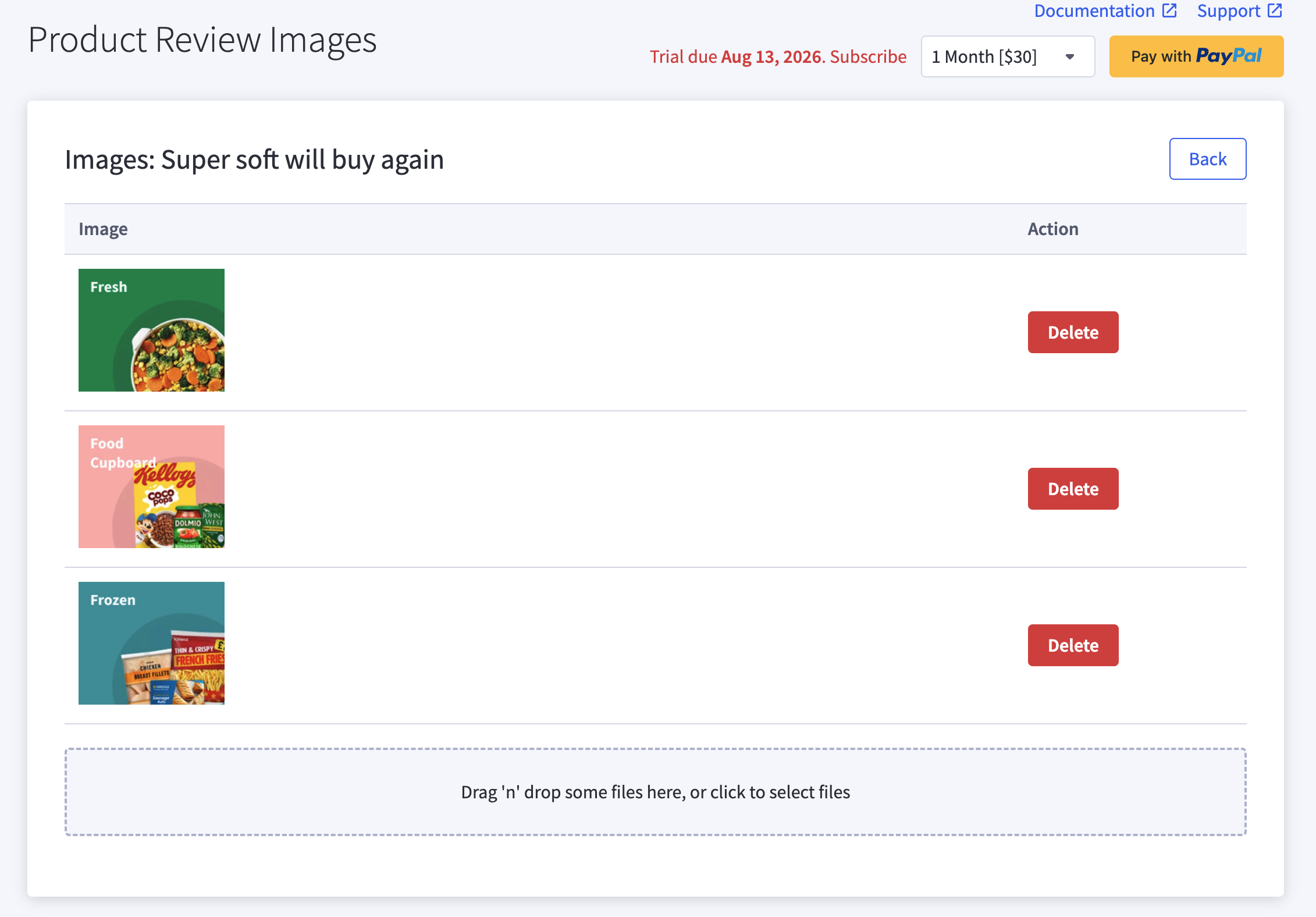
Why this matters: User-generated photos provide authentic social proof that professional product images cannot. When potential buyers see real customers sharing genuine photos, it builds immediate trust and reduces purchase anxiety.
Feature 2: Extended Review Criteria
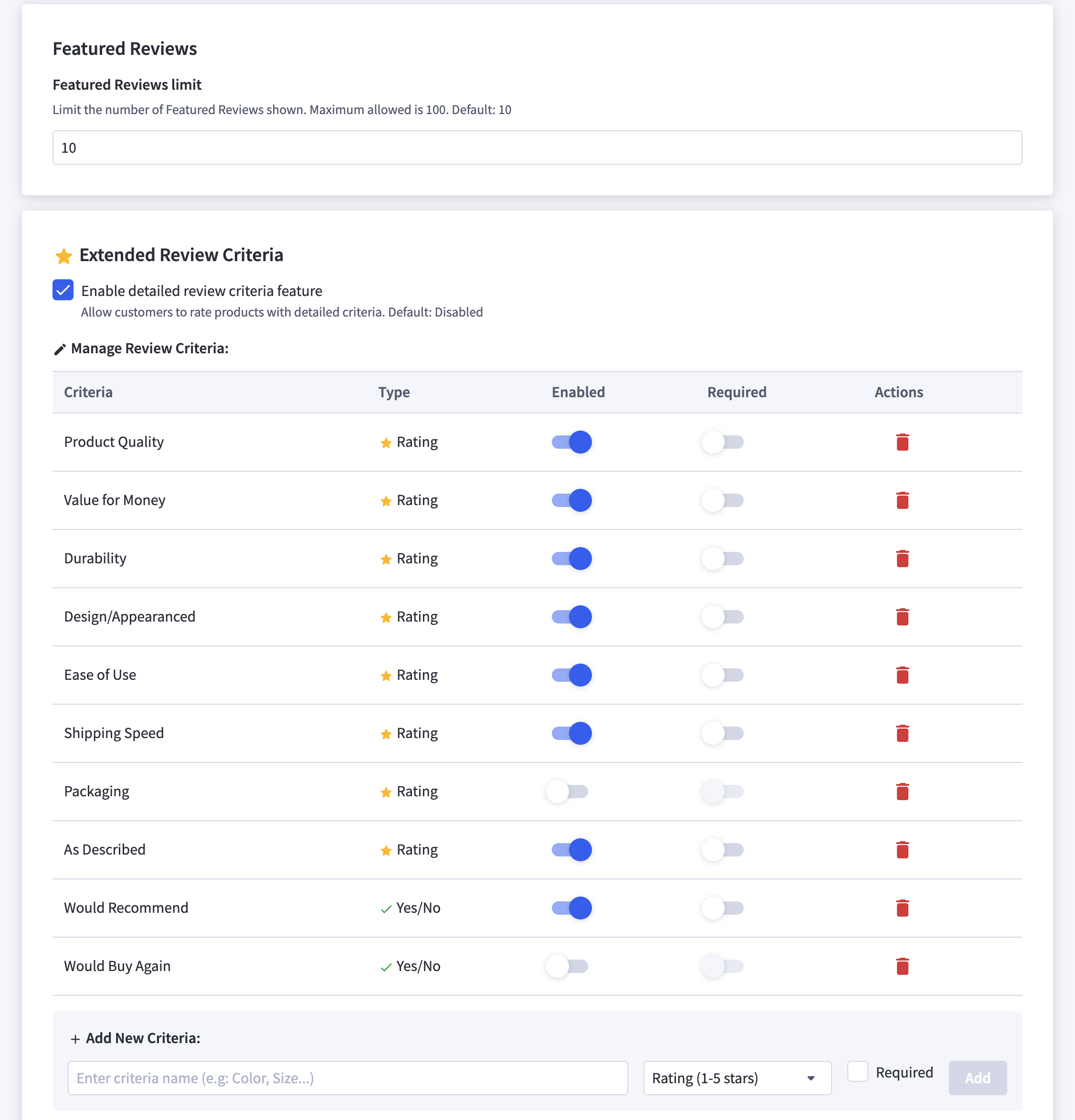
Go beyond simple five-star ratings with extended review criteria that let customers provide detailed feedback on specific product aspects.
Two Rating Types
The app supports two distinct rating types to match different evaluation needs:
Star Ratings (1-5 stars): Perfect for scoring specific attributes like quality, value, durability, or design. Customers give nuanced feedback that helps other shoppers understand exactly what to expect.
Yes/No Ratings: Ideal for quick binary feedback such as "Would Recommend," "True to Size," or "Good Value." These provide at-a-glance insights that speed up purchase decisions.
Ten Built-In Criteria
The app comes pre-loaded with ten commonly used review criteria:
- Quality — Overall product craftsmanship
- Value — Price-to-quality ratio
- Durability — Long-term product resilience
- Design — Aesthetic appeal and style
- Ease of Use — How intuitive the product is
- Shipping — Delivery speed and condition
- Packaging — Product presentation and protection
- Comfort — Physical comfort (apparel, furniture)
- Size Accuracy — True-to-description sizing
- Would Recommend — Overall satisfaction indicator
Fully Customizable
Every criterion is fully customizable. You can:
- Create new criteria specific to your product category
- Rename existing criteria to match your brand voice
- Enable or disable individual criteria per product or store-wide
- Choose the rating type (star or yes/no) for each criterion
For example, a fashion store might use criteria like "Fabric Quality," "True to Size," "Color Accuracy," and "Would Recommend." A tech store might prefer "Build Quality," "Performance," "Battery Life," and "Value for Money."
This flexibility means the review system adapts to your products, not the other way around.
Feature 3: Rich Snippets and Google Star Ratings
One of the most powerful benefits of a robust review system is its impact on search engine visibility. Product Review Images works with BigCommerce's structured data to ensure your reviews and ratings appear as rich snippets in Google search results.
What Are Rich Snippets?
Rich snippets are enhanced search results that display additional information beyond the standard title and description. For product pages, this includes:
- Star ratings (the gold stars you see in Google results)
- Review count ("Based on 47 reviews")
- Price range and availability
- Aggregate rating across all review criteria
How Rich Snippets Help Your Store
When your products show star ratings directly in Google search results:
- Click-through rates increase by up to thirty-five percent — gold stars catch the eye and build instant credibility
- Organic traffic grows — higher CTR signals to Google that your listing is relevant, improving rankings over time
- Competitive advantage — if your competitors do not have stars in their listings, you stand out immediately
- Customer pre-qualification — shoppers who click already trust your product based on ratings, leading to higher conversion rates
Technical Implementation
The app enhances the existing BigCommerce review schema markup to include extended criteria data. This means Google can understand not just the overall rating, but also specific attribute ratings, creating richer and more informative search results.
No additional SEO plugins or manual schema editing is required. The structured data is generated automatically based on your active review criteria and customer submissions.
Feature 4: User-Friendly Admin Panel
Managing reviews should be simple, and the app delivers with a clean admin interface that gives you full control.
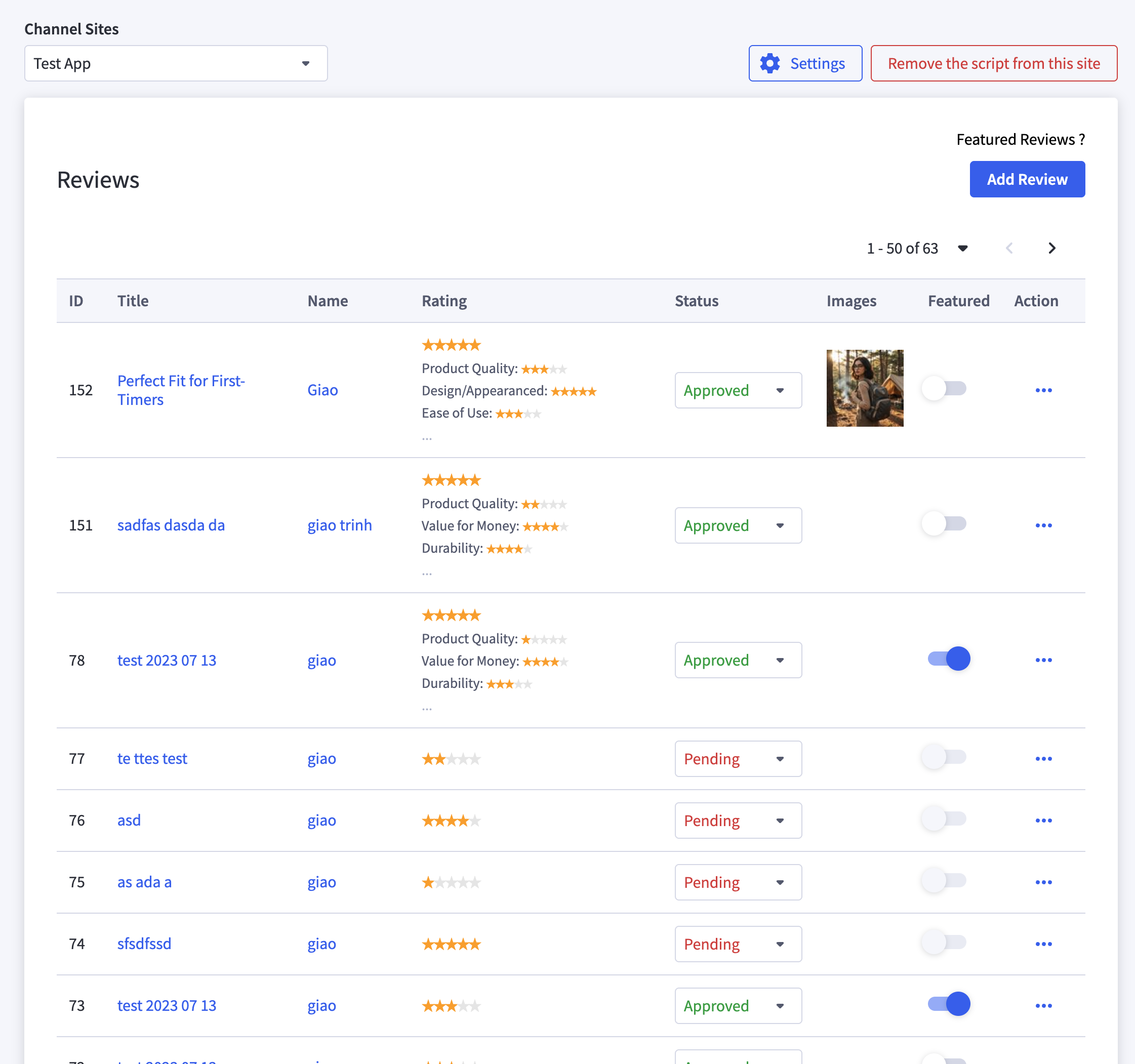
Admin capabilities include:
- Review moderation — Approve, edit, or reject reviews before they go live
- Image management — Add or remove images from any review
- Bulk actions — Efficiently manage large volumes of reviews
- Create reviews — Add reviews manually (useful for showcasing product quality)
- Featured reviews — Toggle which reviews appear in the featured section
- Review analytics — Track review submission patterns and photo upload rates
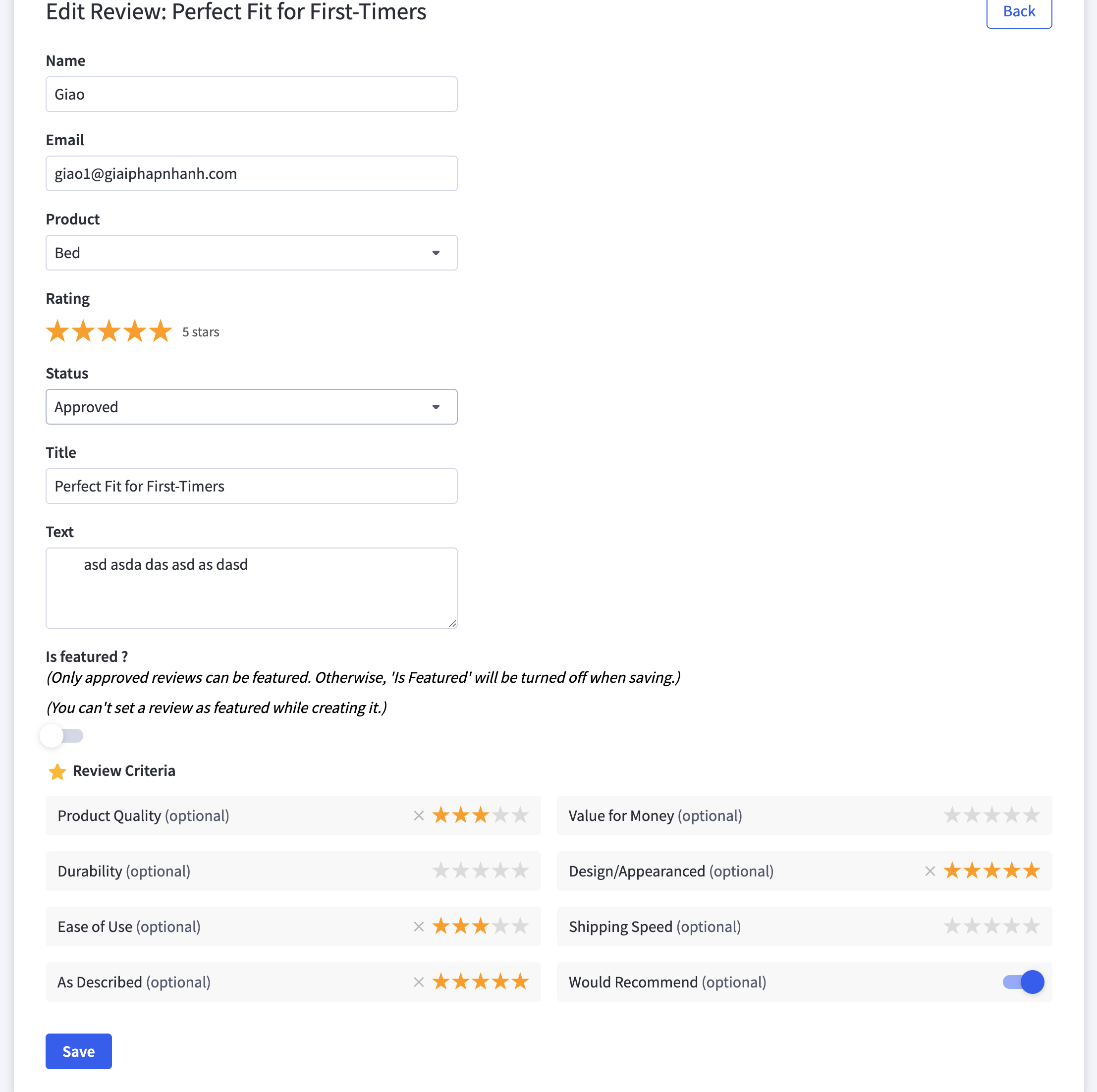
The admin panel is accessible directly from your BigCommerce dashboard, so there is no need to log into a separate platform.
Compatibility and Integration
Works with Every BigCommerce Theme
Product Review Images is designed for universal theme compatibility. Whether you are using a PapaThemes theme, a BigCommerce marketplace theme, or a custom-built Stencil theme, the app integrates seamlessly.
The app achieves this by injecting its components through BigCommerce's Script Manager, which means it works at the platform level rather than the theme level. Your review forms and photo displays automatically match your theme's typography, colors, and layout.
Multi-Storefront Compatible
For merchants operating multiple storefronts on BigCommerce, the app is officially approved as multi-storefront compatible by BigCommerce. This means you can manage reviews with images across all your storefronts from a single installation.
No Conflict with Existing Apps
Because Product Review Images enhances the native review system rather than replacing it, it plays well with other BigCommerce apps. Your existing SEO tools, analytics integrations, and marketing apps continue to work without interruption.
Getting Started: Quick Setup Guide
Setting up Product Review Images takes less than five minutes:
Step 1: Install the App
Visit the BigCommerce App Marketplace and install Product Review Images. The app offers a free seven-day trial so you can test every feature before committing.
Step 2: Configure Script Manager
The app provides a simple script to add via Storefront > Script Manager in your BigCommerce admin. Copy the provided code, paste it into a new script entry, and save. That is it for the storefront integration.
Step 3: Set Up API Access
Create a V2/V3 API token in your BigCommerce admin with Products modify scope. Enter the credentials in the app dashboard to enable the admin review management features.
Step 4: Customize Review Criteria
Navigate to the app settings and configure your extended review criteria. Choose which criteria to display, set rating types (star or yes/no), and customize labels to match your brand.
Step 5: Start Collecting Photo Reviews
Once configured, the photo upload field automatically appears on all product review forms across your store. Encourage customers to share photos by mentioning it in post-purchase emails.
Pricing
Product Review Images is available at thirty dollars per month with a free seven-day trial. There are no upfront fees, no setup costs, and no per-review charges.
Considering that a single conversion from a photo review can easily exceed the monthly cost, the ROI is clear. For most stores, the app pays for itself within the first few days.
Tips for Maximizing Photo Review Impact
1. Encourage Photo Submissions
- Add a note in your post-purchase emails asking customers to share photos with their reviews
- Consider offering a small incentive (discount code, loyalty points) for photo reviews
- Make the review process as frictionless as possible
2. Respond to Reviews
- Thank customers who share photos — it encourages more submissions
- Address negative reviews professionally and constructively
- Show that real people are behind the brand
3. Leverage Reviews in Marketing
- Share standout photo reviews on social media
- Feature top reviews on your homepage or collection pages
- Use review content in email marketing campaigns
4. Optimize for Rich Snippets
- Ensure your product pages have proper schema markup enabled
- Collect reviews consistently — Google favors pages with recent, ongoing review activity
- Monitor your rich snippet appearance using Google Search Console
Conclusion
In an era where online shoppers demand transparency and authenticity, photo reviews are no longer optional — they are essential. The Product Review Images app by PapaThemes makes it effortless to add this powerful trust-building feature to your BigCommerce store.
With image uploads, extended review criteria, customizable rating types, full rich snippet support, and seamless native integration, this app delivers everything you need to transform your product reviews into a conversion engine.
The best part? It works with every theme, preserves your existing reviews, and requires zero coding knowledge. Start your free seven-day trial today and see the difference photo reviews make for your store.
Frequently Asked Questions
Does Product Review Images work with my existing BigCommerce reviews?
Yes. The app enhances BigCommerce's native review system, so all your existing reviews remain intact. There is no need to import or migrate anything. If you ever uninstall the app, your reviews are still preserved in BigCommerce.
Do I need to edit my theme files to install the app?
No. Product Review Images installs through BigCommerce's Script Manager with a simple copy-paste process. It works with any BigCommerce Stencil theme without modifying theme files.
How do rich snippets appear in Google search results?
The app works with BigCommerce's built-in structured data to display star ratings, review counts, and aggregate ratings in Google search results. These rich snippets appear automatically once Google crawls your product pages with active reviews.
Can I customize the review criteria for different product categories?
Yes. You can create, rename, enable, or disable review criteria to match your specific products. The app supports both star ratings (one to five stars) and yes/no ratings, so you can tailor the review experience for each product category.
Is the app compatible with BigCommerce Multi-Storefront?
Yes. Product Review Images is officially approved as multi-storefront compatible by BigCommerce. You can manage reviews across all your storefronts from a single app installation.


